Developers
A healthcare CRM you integrate with, not migrate to.
One script tag adds booking to the site you already have. The Client SDK, the server-side Developer API, API keys, callbacks and theming are all documented today. Webhooks are next.
Most clinic software wants to own the front door. MedOS is built the other way round: your website stays, and the parts of MedOS a patient touches are embeddable widgets that render inside it. The booking flow, the patient portal, an enquiry form and package purchase are each one script tag, configured in a few lines, with callbacks so your page knows what happened.
Behind them is one API key model. An SDK widget key is publishable and bound to your website’s domain. A Developer API key is secret, bound to your servers’ IP addresses, and lets your backend book, reschedule and cancel, run queue tokens and manage patients directly. Every key begins with mk_, and all of them are created and revoked in the MedOS dashboard.
The whole install
Booking on your site in the time it takes to paste this.
<script src="https://widgets.medos.one/v2/unified.js"></script>

<!-- Inline: renders inside your page -->
<div id="booking-container" style="min-height: 600px;"></div>
<script>
  MedosBooking.init({
    apiKey: "mk_your_publishable_key",
    mode: "inline",
    containerId: "booking-container",
  });
</script>

<!-- Or modal: opens on a button -->
<script>
  MedosBooking.init({
    apiKey: "mk_your_publishable_key",
    mode: "modal",
    theme: "default",
    onSuccess: (data) => {
      console.log("Booking confirmed", data);
    },
  });
</script>
<button onclick="MedosBooking.open()">Book appointment</button>
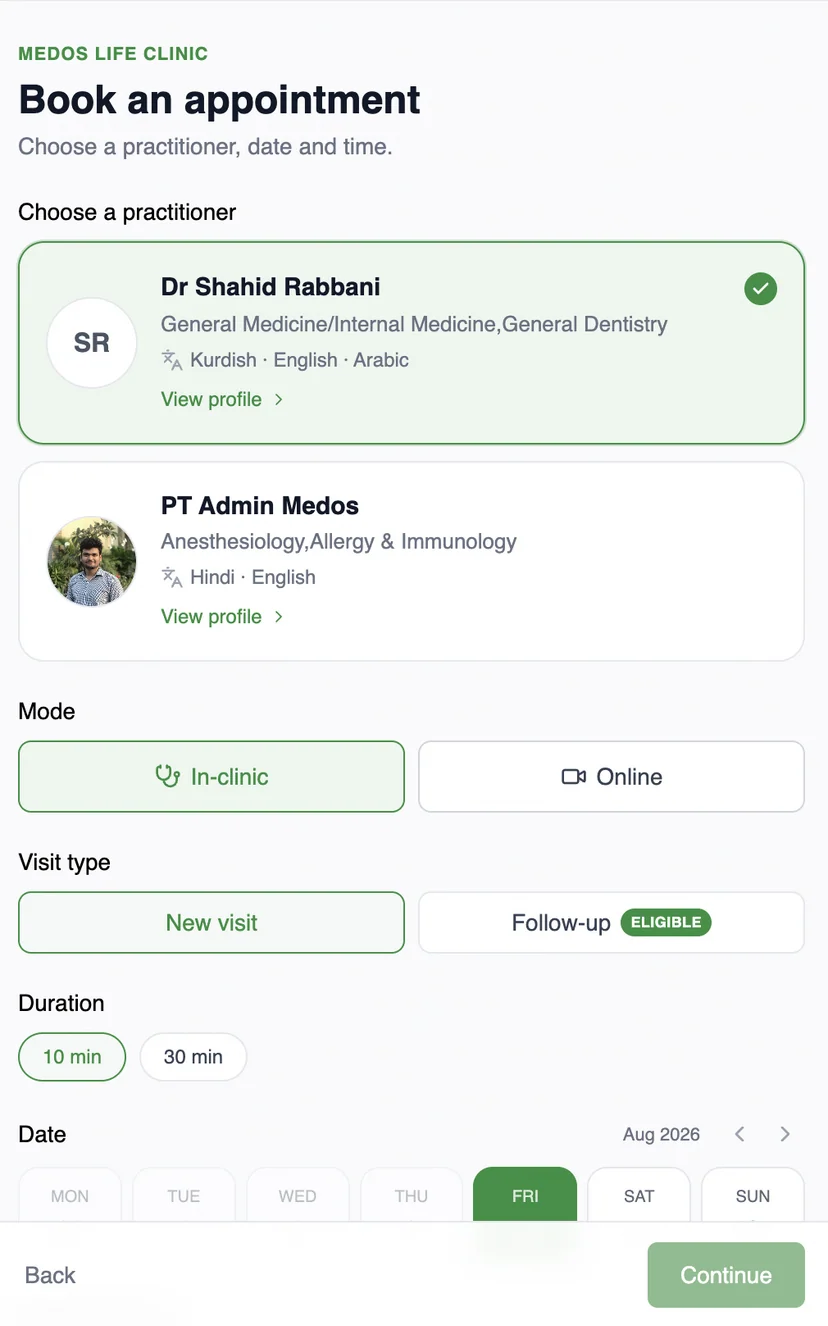
Modal or inline, your theme, and callbacks for success and error. The widget reads each practitioner’s configuration and shows either scheduled slots or a live queue without you choosing. Full widget documentation, or see it running on a demo clinic website.
Four widgets, one script
- Booking widget
- The full booking flow: practitioner, mode, visit type, slot, OTP and payment. Adapts on its own to a scheduled or a queue-based practice.
- Patient portal
- Returning patients manage their own appointments, family members and session credits, embedded on your site.
- Enquiry form
- A lead form that lands in MedOS with the patient record started, so a follow-up call has context.
- Package purchase
- Session packs and care packages sold from your own site, drawn down visit by visit afterwards.
API keys
Two kinds of key, one place to manage them.
- SDK widget keys
- For the widgets on your website. Publishable by design, bound to your site’s domain, and exchanged for a short-lived session token when a widget initialises.
- Developer API keys
- For your backend. Secret, sent in the x-api-key header, and refused from any address that is not on the key’s IP allowlist. Rotated with no downtime.
What is documented, and what is next
- Booking, enquiry and package widgets; patient portal widget in beta
- Modal and inline modes, theming, playground
- onSuccess and onError callbacks
- Client SDK reference for all four widgets
- Server-side Developer API with IP allowlists
- Back-office endpoints: patients, clinical records, configuration
- SDK widget keys and Developer API keys
- Scheduled and queue-based booking, detected per practitioner
- Webhooks
- Dashboard guide
Need events before webhooks land? Tell us in the walkthrough what you are building.
No migration
Your website stays. Your operations get better.
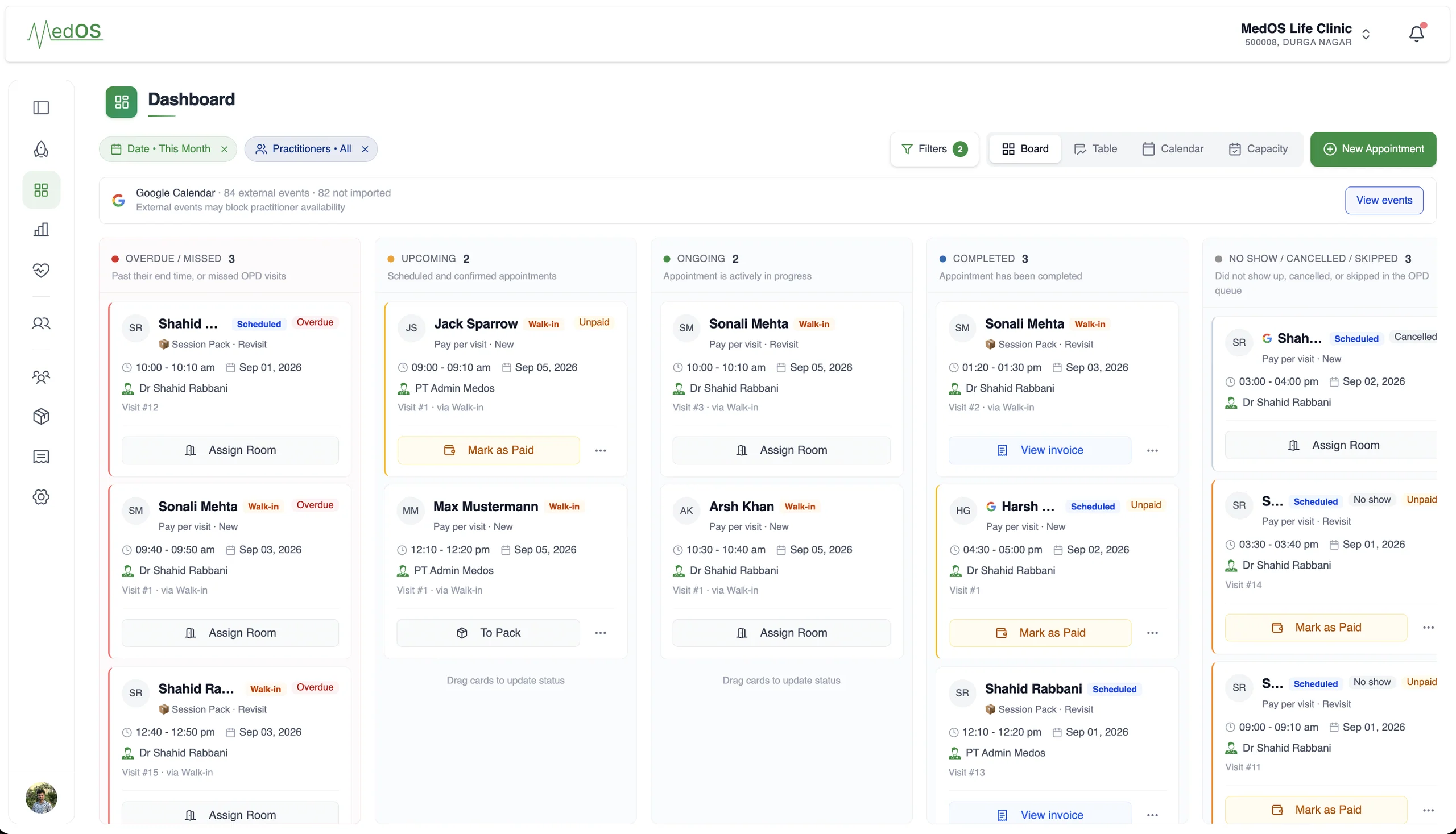
You do not rebuild your digital presence to run on MedOS. Patients keep arriving through the site, the link or the QR you already share. Every route lands in the same patient experience, and every booking lands in the same operations.
- 01
Embed the booking widget
One script tag adds booking to the site you already have, themed to match it. This is the only part that lives on your website.
- 02
Share a booking link
No site changes at all. Put the link in your Google Business Profile, on WhatsApp, or in an Instagram bio.
- 03
Print the QR
At the door, on the desk, on a flyer. It opens the same booking and check-in flow.
OTP-verified, branded to your clinic, on the patient’s own phone. Self check-in, payment and Google Meet links are part of the same flow.
What the widgets connect to
- Online booking
A patient books from your website, a shared link or a QR at the door. The booking lands in the upcoming column of the board with nothing re-typed at the desk.
Read more - Self check-in
Patients verify who they are and book a slot or join the queue from their own phone. They are on the board before they reach the desk. Nobody re-enters a name.
Read more - Session packs
Rehab, therapy and wellness happen over a course of visits, not one appointment. MedOS treats the programme as the unit.
Read more - Patient records
Visits, last seen, next appointment, outstanding balance, notes, prescriptions and activity, on one record. Nothing is re-entered at the desk.
Read more